

 Italiano
 Français
 Deutsch
 Español
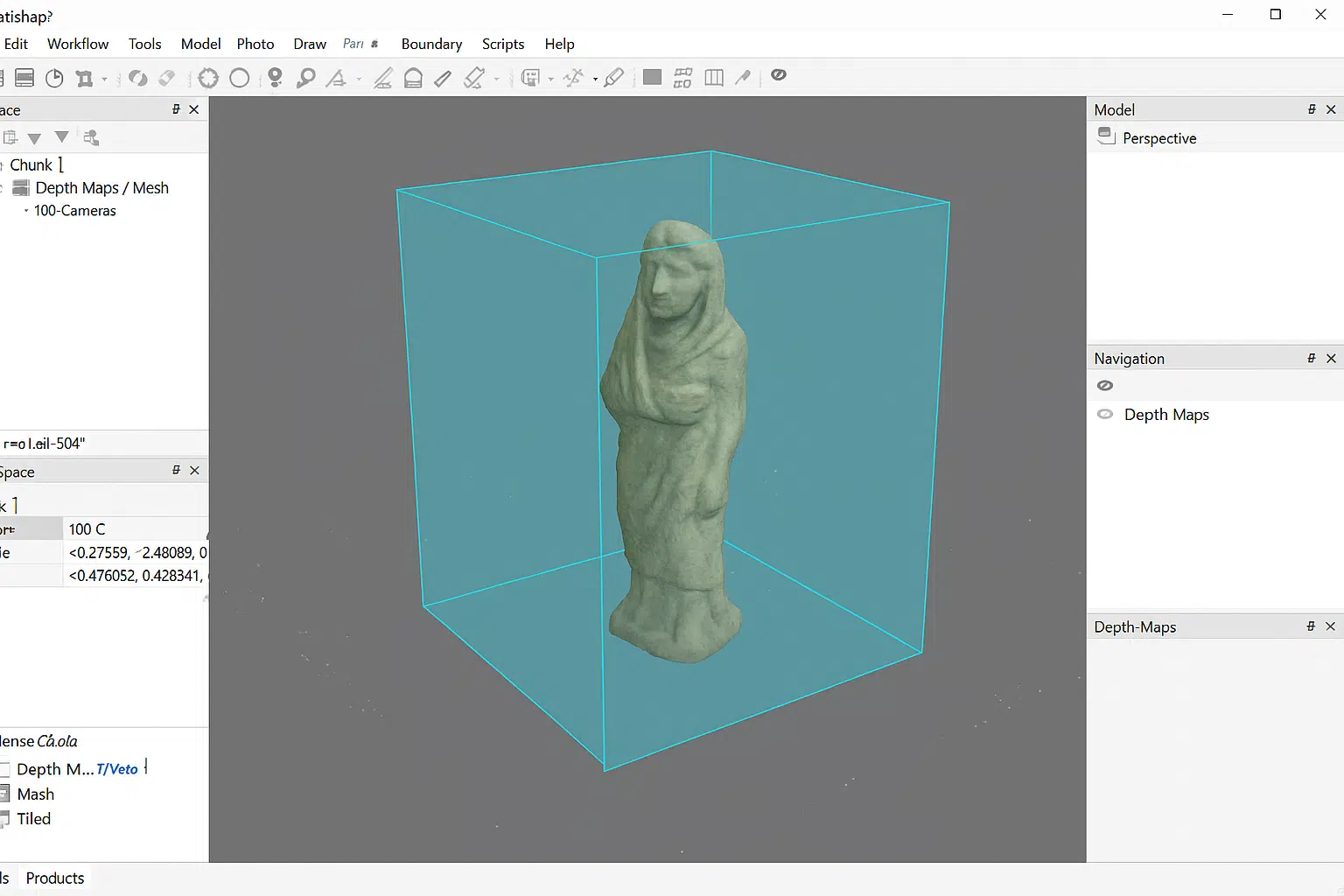
Agisoft Metashape is a powerful photogrammetry software used by professionals in surveying, archaeology, film production, and 3D modeling. One of its most advanced and effective tools for enhancing model quality is volumetric masking. When applied during the depth map generation stage, volumetric masks can dramatically improve the quality and accuracy of mesh models by excluding unwanted areas from the reconstruction process.
This guide explores how volumetric masking works in Metashape, why it is important for depth map-based workflows, and how to use it effectively to achieve professional-grade 3D models. Whether you are working on large-scale mapping projects or highly detailed object reconstructions, mastering volumetric masking will elevate your results to a new level.
Understanding Volumetric Masking in Metashape
Before diving into the workflow, it’s important to understand what volumetric masking is and how it differs from traditional masking techniques. In Metashape, a mask is typically applied directly to individual images to exclude unwanted areas (such as background clutter, shadows, or irrelevant objects) from processing. Volumetric masking, however, works on a different principle: it defines a 3D spatial region in which the reconstruction should occur, effectively limiting depth map generation and mesh construction to a specified volume of space.
This approach is particularly useful when you need to:
- Focus reconstruction on a specific object or region of interest.
- Exclude background noise, surrounding structures, or irrelevant surfaces.
- Improve processing performance by reducing unnecessary data.
- Generate cleaner and more precise depth map-based mesh models.
Unlike traditional image masks that work on 2D photo data, volumetric masking operates directly on the 3D reconstruction space. This means you can apply it even after the alignment stage to control which parts of the scene contribute to depth map generation and final mesh creation.
Why Volumetric Masking Matters for Depth Map-Based Mesh Generation
Depth maps are one of the most critical components of the photogrammetry workflow in Agisoft Metashape. They represent the distance from the camera to objects in the scene and serve as the foundation for building the dense point cloud and subsequent mesh model. However, depth maps can also include unwanted data — such as background elements, reflections, or noise — that can degrade the quality of the final mesh.
Here’s how volumetric masking enhances depth map-based workflows:
1. Cleaner Meshes with Fewer Artifacts
By restricting reconstruction to a defined volume, you prevent background elements or distant structures from being included in the mesh. This reduces artifacts, eliminates floating geometry, and results in cleaner, more accurate surfaces.
2. Improved Accuracy and Detail
Volumetric masks allow Metashape to focus its computational resources on the area that matters most. This leads to higher resolution depth maps, more precise point clouds, and detailed mesh models with better-defined geometry.
3. Faster Processing Times
Processing only the necessary volume means fewer points to calculate and fewer polygons to generate. This not only speeds up depth map computation but also reduces the time required for mesh building and texturing.
4. Greater Control Over Reconstruction
Volumetric masking gives you precise control over the reconstruction space, making it easier to isolate individual objects, focus on specific layers, or segment complex scenes into multiple parts for separate processing.
How to Use Volumetric Masking in Agisoft Metashape
Implementing volumetric masking in Metashape is straightforward once you understand the workflow. Below is a step-by-step guide to applying it during depth map-based mesh generation:
Step 1: Align Photos and Build the Sparse Cloud
Start by importing your photos into Metashape and aligning them. This step creates the sparse point cloud and determines camera positions. Ensure that alignment is accurate, as volumetric masking relies on a well-defined 3D reconstruction space.
Step 2: Define the Reconstruction Region
Metashape automatically generates a reconstruction box that defines the volume where processing occurs. You can adjust this box by clicking the “Resize Region” and “Rotate Region” tools in the toolbar. Use these tools to tightly enclose your object or area of interest.
Pro Tip: For best results, keep the region slightly larger than the object to ensure complete coverage while still excluding irrelevant space.
Step 3: Apply Volumetric Masking (Optional Fine-Tuning)
If your project requires more refined control, you can combine the reconstruction region with additional masking techniques:
- Import 3D shapes: Use external geometry (like a bounding mesh) to define complex volumes.
- Combine with 2D masks: Apply traditional image masks first, then refine the reconstruction with volumetric masking for optimal results.
These approaches are useful for isolating objects with irregular shapes or excluding complex background structures.
Step 4: Build Depth Maps
With the volumetric region defined, proceed to Workflow → Build Depth Maps. Metashape will now compute depth maps only within the specified 3D volume, ignoring data outside of it. This ensures that your depth data is clean, focused, and free of unnecessary points.
Step 5: Generate the Mesh from Depth Maps
After building the depth maps, continue to Workflow → Build Mesh. Select Depth Maps as the data source. The resulting mesh will reflect the constraints of your volumetric mask, producing a precise and artifact-free model focused on your target object.
Best Practices for Volumetric Masking
To get the most out of volumetric masking in Metashape, follow these best practices:
- Tightly define the reconstruction region: Avoid overly large volumes, which can reintroduce noise and reduce processing efficiency.
- Combine masking methods: Use 2D masks for image-level cleanup and volumetric masks for spatial control.
- Use incremental refinement: Start with a broader volume and gradually refine it based on intermediate results.
- Segment large projects: For complex scenes, process separate volumes individually and merge them later.
These techniques will help you strike the right balance between processing speed, accuracy, and model quality.
Advanced Techniques: Volumetric Masking with Python Automation
For advanced users, Metashape’s Python API allows volumetric masking to be integrated into automated pipelines. You can script tasks such as defining reconstruction regions, applying custom volume shapes, and running depth map generation — all without manual intervention.
This is especially valuable for large-scale industrial applications, such as mining, construction, or automated object scanning, where consistent processing and repeatable results are essential.
Applications of Volumetric Masking in 3D Modeling
Volumetric masking is widely used across industries and research fields to enhance depth map-based mesh generation. Some key applications include:
- Cultural Heritage: Digitizing artifacts and sculptures while excluding background surfaces from museum environments.
- Industrial Inspection: Reconstructing specific machinery parts with millimeter accuracy by isolating them from surrounding components.
- Environmental Surveying: Focusing on key terrain features or structures without including irrelevant vegetation or obstacles.
- Visual Effects and Virtual Production: Building detailed assets for film and gaming without post-processing cleanup.
Conclusion: A Powerful Tool for Cleaner and More Accurate Meshes
Volumetric masking in Agisoft Metashape is an advanced yet accessible tool that can significantly improve the quality and efficiency of your depth map-based mesh generation. By defining a 3D reconstruction volume, you gain precise control over what data is included in the final model, resulting in cleaner meshes, fewer artifacts, faster processing times, and higher overall accuracy.
Whether you’re digitizing cultural artifacts, surveying landscapes, or creating 3D assets for visual effects, volumetric masking is an essential technique to include in your photogrammetry toolkit.
